skip to content
jasondank.com/projects/remote-gpu-server

Projects / 2024 · 12 of 13

Remote Compute Environment for AI Fine-Tuning

$ ssh zbookAnywhereTailscale · WireGuard tunnelpersistent SSH, no open portsHP ZBOOK FURY · WINDOWSWSL2 · UBUNTUdocker: traineridletraining…RTX A3000CUDAidle shutdowns0keep-aliveonGPU passthroughready$ ssh jason@zbookWelcome to Ubuntu on WSL2 · reached over Tailscale$ nvidia-smi --query-gpu=name,utilization.gpu --format=csvNVIDIA RTX A3000 Laptop GPU, 0 %$ docker compose run --gpus all trainerepoch 2/3
SSH over Tailscale into WSL2 on the ZBook, where a container trains on the GPU

What it does

Systematic transformation of an HP ZBook Fury laptop into a robust, always-on home server infrastructure. Solved critical challenges including WSL2's idle shutdown behavior, secure SSH-over-Tailscale connectivity, and GPU passthrough configuration for CUDA workloads.

  • Engineered a reproducible WSL2-based Linux training environment with containerized workflows on an HP ZBook Fury.
  • Solved WSL2's idle shutdown behaviour, configured persistent SSH over Tailscale, and set up GPU passthrough for CUDA workloads — enabling remote fine-tuning with zero idle shutdowns.

What I'm proudest of

I turned a laptop into an always-on server. Beating WSL2’s idle shutdown and getting CUDA passthrough working were the hard parts, and now I can start a training run from anywhere over Tailscale.

Screenshots
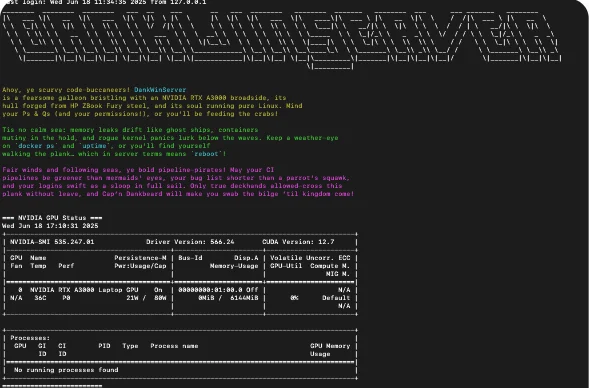
Logging in to the server: its banner and nvidia-smi showing the NVIDIA RTX A3000 laptop GPU available to CUDA